Global Settings
These are settings that can be set globally for all translations.
These are found in Settings -> Translation Manager.
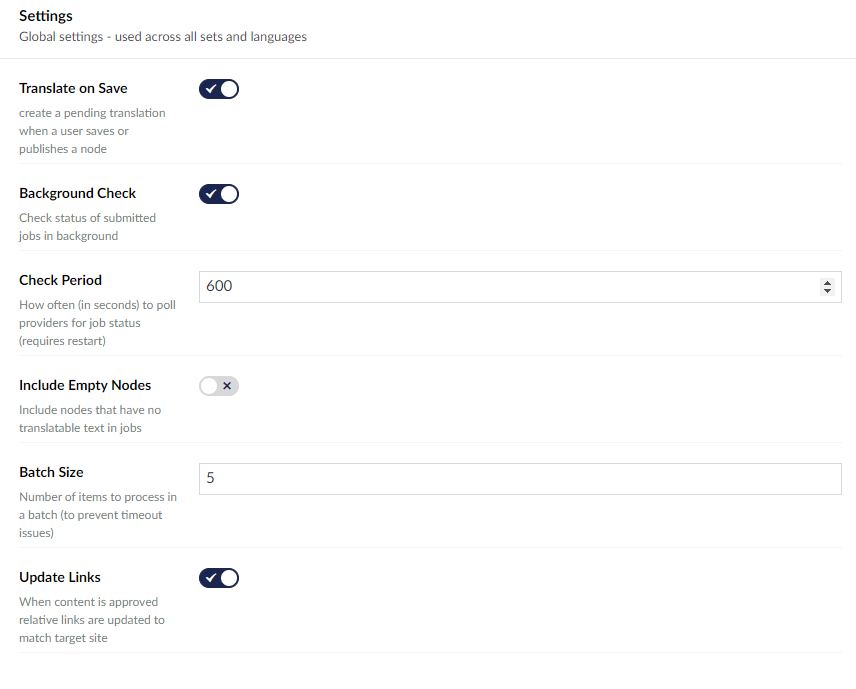
Settings
A limited number of settings can be changed in the backoffice.
Update Links
When content is approved, links will update to match the target site.
Core Config
In Umbraco the global settings are read from the appsettings.json file.
All these settings will have a default value and do not need set within the appsettings file, unless you are overriding the default setting.
{
    "Translation": {
        "autoTranslate": true,
        "autoTranslatePublishOnly": false,
        "backgroundApproval": false,
        "backgroundCheck": true,
        "batchSize": 25,
        "CheckLinksOnLoopback": false,
        "fixup": false,
        "hideLicenceTab": false,
        "history": true,
        "includeEmpty": false,
        "relationType": "relateDocumentOnCopy",
        "returnToPending": false,
        "scheduleCheckPeriod": 180,
        "UniqueNestedIds": true,
        "links": {
            "inline": true,
            "pickers": false,
        },
        "notify": {
            "pending": "",
            "approved": "",
            "submitted": "",
            "received": "",
            "disabled": false,
            "subject": "Translations : [{job}] - {eventName}",
        },

        "mappers": {
            "inline":{
                "tags": "img,a",
                "attributes": "title,alt",
                "strict": true,
            },
            "text":{
                "text": "string.Empty",
            }
        }
    }
}
autoTranslate
Saves the changes that have been made in Pending.
"Translation": {
     "autoTranslate": true,
  }
autoTranslatePublishOnly
Only published items are put into the pending queue
"Translation": {
    "autoTranslatePublishOnly": false,
  }
BackgroundApproval
Allows the approval process to run in the background (so you don't have to sit around and watch it happen).
 "Translation": {
    "backgroundApproval": false
  }
backgroundCheck
Periodically checks the status of submitted Jobs automatically.
 "Translation": {
    "backgroundCheck": true,
  }
batchSize
Number of items to process in a batch (if you are experiencing timeouts, try lowering this number).
"Translation": {
    "batchSize": 25,
  }
CheckLinksOnLoopback
Toggle whether or not links within content are checked on translations that are using variants. By default, links are only checked on translations between two different sitenodes.
"Translation": {
    "CheckLinksOnLoopback": false,
  }
fixup
Turns on debugging in interface by default, so you can delete the things you can't usually delete. You can turn this on per request by adding &tm=debug to the url.
"Translation": {
    "fixup": false,
  }
hideLicenceTab
Hide the licence tab from the UI. This setting is useful if you dont want anyone to see the licence key.
"Translation": {
    "hideLicenceTab": false,
  }
history
Shows the history tab on a job. This allows you to see events. This setting is on by default
"Translation": {
    "history": true,
  }
includeEmpty
Include nodes with no translatable text in jobs.
"Translation": {
    "includeEmpty": false,
  }
relationType
Default Umbraco relation used to link pages across languages.
"Translation": {
    "relationType": "relateDocumentOnCopy",
  }
returnToPending
Put translated content back into the pending queue if a job is cancelled. May cause conflicts. This setting is off by default.
"Translation": {
    "returnToPending": false,
  }
scheduleCheckPeriod
The number specifies how often the background check occurs.
"Translation": {
    "scheduleCheckPeriod": 180,
  }
UniqueNestedIds
Ensures that block and nested items get unique internal IDs when tranlated into other languages. By default these IDS are seperate, but depending on your set up you may want them to remain the same.
"Translation": {
    "UniqueNestedIds": true,
  }
notify
The email adresses that notifs will be sent to when jobs reach a certain stage.
"Translation": {
    "notify": {
            "pending": "",
            "approved": "",
            "submitted": "",
            "received": ""
            "disabled": false,
            "subject": "Translations : [{job}] - {eventName}",
        },
  }
notify:subject
The template for the subject is ID, source, and target, ID. The ID is the job ID, the source is the source language, and the target is the target language. The options for eventname are pending, approved, submitted, and recieved
"notify": {
    "subject": "Translations : [{job}] - {eventName}",
 },
mappers
Mappers are explained on the Property Mapping page.